

Looking for a stable and user-friendly IPTV player For your smart TV or media player? Hot Player is one of the most modern choices available today. Whether you use a Samsung, LG, Android, or Firestick, this app lets you stream your favorite content effortlessly.
In this guide, we'll explain how to install and activate Hot Player. Want to know which subscription is best for you? Then read our article about it. Buy IPTV: Best subscriptions and tips for the Netherlands.
Why Choose Hot Player?
Hot Player is a pure media player. This means the app itself doesn't contain any content, but gives you the freedom to add your own playlists.
- Broad support: Works on almost any device (Samsung, LG, Android, iOS, Windows).
- Stable performance: Optimized for M3U playlists and Xtream Codes.
- Ease of use: Simple interface for the whole family.
Step-by-step Installation Guide
Follow these simple steps to install Hot Player on your device.
1. Samsung Smart TV & LG Smart TV
- Go to the App Store (Samsung) or Content Store (LG).
- Search for Hot Player.
- Install and open the app.
- You immediately see your MAC address on the screen. Write this down.
2. Android TV & Android Mobile
- Open the Google Play Store.
- Search for the Hot Player App and install it.
- Launch the app to see your MAC address/device code.
- 👉 Direct link: Hot Player in Google Play
3. Amazon Fire TV Stick
- Install the “Downloader” app if you don’t have it already.
- Go to Settings > My Fire TV > Developer Options and allow apps from unknown sources.
- Download the Hot Player APK from the official site.
- Install the app and write down your MAC address.
4. Windows, iOS & Roku
- PC/Laptop: Download from the Microsoft Store or official website.
- Apple (iOS/macOS): Available on the App Store.
- Roku: Search the Roku Channel Store.
Activate Your Playlist
Do you have a subscription with Bestever IPTV or another provider? Easily connect your data via the portal.
- Go to the upload page: https://hotplayer.app/upload.
- Fill your MAC address in.
- Paste your M3U link (which you received by email) in the “Link” field.
- Give your list a name (e.g. “IPTV Home”) under “Playlist name”.
- Click save.
- Restart the app on your TV (or click 'Refresh') to watch immediately.
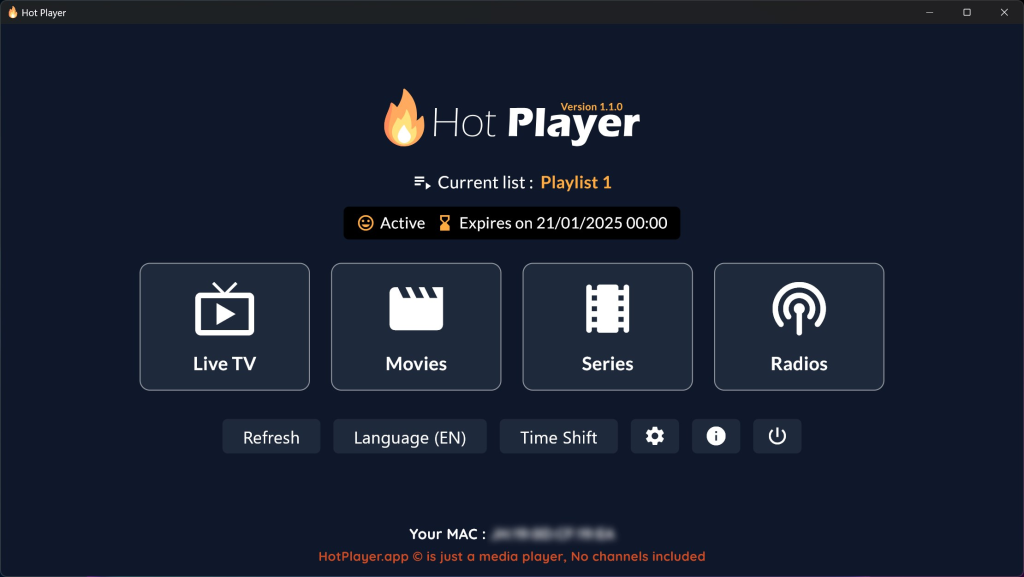
Tip: Looking for a free alternative or having trouble installing? Then check out our guide for IPTV Smarters Pro: Complete Manual.
Conclusion
Hot Player offers a flexible way to watch TV on your terms. Note: the app often offers a 30-day trial period, after which a one-time payment of approximately €5.99 is required through the developer.
Are you ready to enjoy thousands of channels and movies in top quality? Choose certainty and quality with Bestever IPTV, the trusted choice for all your streaming needs.


 English
 Nederlands
 Nederlands (België)
 Français